

Stardock Fences 6.54
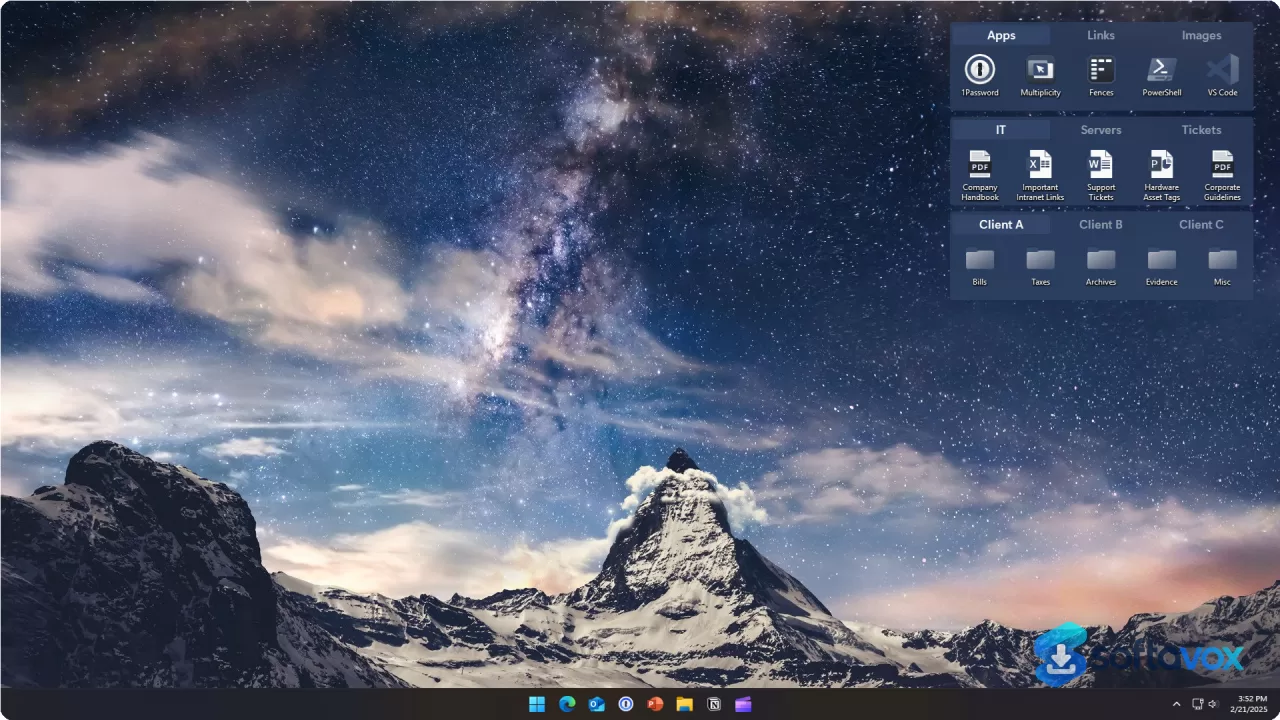
Fences is Stardock's premium desktop organization tool for Windows 10 and 11, letting you group icons into customizable, labeled containers called "Fences." The latest version 6 adds tab support, icon tinting, revamped Folder Portals, ARM processor support, and better DPI scaling for high-resolution monitors. The signature feature, double-clicking to hide all icons, remains patented and delightful. Pricing starts at $29.99 for a perpetual license, with yearly and multi-device options available. It's the most polished desktop organizer available, but persistent bugs like broken auto-icon-spacing and occasional license reactivation issues are well-documented. Free alternatives include Portals, DesktopBox, and DeskBox.
- Free trial
- Windows
- Nov 11, 2026
4a1b0306750a2280814700ebb8d184ce19b34691d01246fd1c869837161b4e0bVirusTotal report ↗Screenshots
About Stardock Fences
Stardock Fences Download, Desktop Icon Organizer for Windows
TL;DR Quick Take / Who is this for?
Stardock Fences is a desktop organization utility for Windows that lets you corral scattered icons into resizable, labeled containers called "fences"[reference:0]. It is aimed at anyone whose desktop has become an unusable junk drawer of shortcuts, screenshots, and forgotten downloads. The latest release, Fences 6, introduces a tabbed container system that lets you stack multiple fence groups into a single space, significantly reducing visual clutter for power users with many categories of icons[reference:1]. Other notable features include Folder Portals that mirror live folder contents, Auto-Organize rules that route incoming files to the correct fence, and multi-page desktops that function like phone home screens[reference:2]. The core idea works, and for many users, it genuinely transforms a chaotic desktop into a functional dashboard. The trade-offs, however, are significant. User reports for version 6 frequently describe severe sluggishness when resizing, moving, or even interacting with fences, a problem that was severe enough for some long-time users to roll back to version 5[reference:3]. A beta patch was released to address the issue, but it indicates a rocky rollout[reference:4]. Customer support is also a recurring pain point, with users describing a process that funnels them to community forums instead of providing direct assistance. Stardock Fences is the right pick for Windows power users who want the most feature-rich desktop organizer available and are prepared to troubleshoot potential performance regressions. It is not the best choice for casual users who want a simple, set-and-forget tool, or for anyone using an ARM-based Windows device, as Fences is not compatible with ARM CPUs[reference:6].
Quick Info Box
| License Type | Paid, subscription-based (from $9.99/year) with a free trial available[reference:7][reference:8] |
|---|---|
| File Size | Approx. 23 MB (installer)[reference:9][reference:10] |
| OS Compatibility | Windows 10 and Windows 11 (64-bit); not compatible with ARM CPUs[reference:11][reference:12] |
| Latest Version | 6.2.0.1 (as of December 2025)[reference:13] |
| Developer | Stardock Software |
Key Features & Real-World Usability
Fences' core workflow is simple: you draw a rectangle on your desktop, name it, and drag icons into it. The software immediately snaps those icons into a tidy, aligned grid within the container. The real power, however, lies in the features added in recent versions, which are designed for users who need to manage a large number of icons without sacrificing desktop real estate. The headline addition in Fences 6 is Tabs. Instead of creating five separate fences for Work, Personal, Media, Games, and Downloads, you can create a single fence with five tabs, switching between them with a click[reference:14]. This is a genuinely useful innovation for reducing clutter without reducing access. Folder Portals turn a fence into a live view of a real folder on your drive; anything you save to that folder appears automatically inside the fence, which is perfect for a Downloads or active project directory[reference:15][reference:16]. Auto-Organize rules can automatically route incoming desktop icons into the correct fence based on file type, name pattern, or source location, eliminating manual dragging for new files[reference:17]. Other quality-of-life features include Desktop Pages (multiple desktop spaces for different contexts), Quick Hide (double-click the desktop to instantly hide all fences for clean screenshots or screen sharing), and Roll-Up (collapse a fence to just its title bar)[reference:18]. The software also supports icon tinting for color-coding and blur backgrounds for a frosted-glass look that integrates with Windows 11's design[reference:19][reference:20]. The limitations are primarily related to stability and performance. As noted, version 6 introduced significant lag for a subset of users, particularly those on high-end NVIDIA GPUs, which required a beta patch to resolve[reference:21]. The interface, while functional, has not received a major visual overhaul and can feel dated compared to modern Windows apps. There is no official support for ARM-based Windows devices, which excludes a growing category of lightweight laptops and tablets[reference:22].
- Tabs (Fences 6): Combine multiple fence groups into a single container with switchable tabs, drastically reducing desktop clutter for power users[reference:23].
- Folder Portals: Turn a fence into a live mirror of a folder on your drive, so new files appear automatically without manual sorting[reference:24].
- Auto-Organize Rules: Automatically route incoming desktop icons to specific fences based on file type, name, or source[reference:25].
- Desktop Pages: Create multiple desktop spaces, each with its own set of fences, to separate work, personal, and project contexts[reference:26].
- Quick Hide and Roll-Up: Double-click the desktop to hide all fences instantly, or collapse individual fences to their title bars to free up space[reference:27].
- Icon Tinting and Blur Backgrounds: Apply color tints to icons for visual coding and give fence containers a frosted-glass appearance[reference:28][reference:29].
Pros, Cons & Community/User Feedback
User sentiment around Stardock Fences is deeply divided, and the split maps closely to whether a user has experienced the version 6 performance issues. On the positive side, the core concept is widely praised. A MakeUseOf reviewer describes Fences as the tool that finally solved their desktop clutter, noting that it "makes it ridiculously easy to group and arrange icons" and that the Folder Portal feature is "handy if you have a specific folder that you use every day"[reference:30]. The Themia review highlights that Fences 6's Tabs feature "changes how power users think about the layout of their desktop" and that the combination of Folder Portals, Auto-Organize rules, and Desktop Pages provides genuine utility for managing a heavily populated desktop[reference:31][reference:32]. CHIP's editorial review gives the software a "Satisfactory" rating, praising its box system for creating order and its clear visual design[reference:33]. The core functionality works, and for many users, it is an indispensable productivity tool. The complaints, however, are specific and severe. The most damaging issue is the performance regression in version 6. Multiple users on Stardock's own forums report that after upgrading, "it's terribly sluggish," with resizing, moving, and even deleting files inside a fence causing significant lag[reference:34][reference:35]. One user on a high-end system (RTX 3090, i7-9700K) described the lag as "terrible" and ultimately rolled back to version 5.89 to restore responsiveness[reference:36]. A Stardock community assistant acknowledged the issue, attributing it to a "two systems fighting each other" problem, and provided a beta patch that users confirmed resolved the lag[reference:37]. This indicates that the problem, while serious, is being addressed. The second major theme is customer support. A Trustpilot reviewer describes a frustrating cycle where updates break functionality, and support tickets are answered only with instructions to post on community forums, which often do not have solutions. This sentiment is echoed in other complaints about the support process feeling like the user is doing the company's job. The third issue is stability and compatibility. Some users report that updates have scrambled their display configurations or that fences fail to display icons correctly under heavy use[reference:39][reference:40]. The software is also confirmed to be incompatible with ARM-based Windows devices[reference:41].
Pros
- Transforms a cluttered desktop into a structured, labeled dashboard
- Powerful Tabs feature (Fences 6) allows many icon groups in a single container
- Folder Portals provide live views of real folders, eliminating manual syncing
- Auto-Organize rules automate the sorting of incoming desktop files
- Quick Hide and Roll-Up features are genuinely useful for presentations and screen sharing
- Highly customizable appearance with icon tinting and blur effects
Cons
- Version 6 introduced severe performance lag for some users, requiring a rollback or beta patch[reference:42]
- Customer support is widely criticized as unhelpful and forum-focused
- Not compatible with ARM-based Windows devices[reference:44]
- Subscription-based pricing model (from $9.99/year) for a desktop utility
- Updates have caused display configuration issues for some users[reference:45]
- Automatic sorting and auto-icon-spacing have been reported as unreliable in version 6[reference:46][reference:47]
Final Verdict & Safe Download Advice
Stardock Fences remains the most feature-complete desktop organizer for Windows, and when it works, it works exceptionally well. The Tabs feature in Fences 6 is a genuine innovation for power users, and the combination of Folder Portals, Auto-Organize, and Desktop Pages offers a level of control that free alternatives simply do not match. If you are a Windows power user with a dense desktop and you are willing to navigate the potential performance hiccups of version 6, Fences can be a transformative tool. The caveats, however, are serious enough to give pause. The version 6 lag was a widespread and severe issue that required a beta patch to fix, and the customer support experience is consistently described as frustrating. The software is also incompatible with ARM devices and is sold on a subscription, which is a hard sell for a utility that many users expect to buy once. If you are on the fence, take advantage of the free trial, test it thoroughly on your specific hardware and Windows version, and confirm that the performance is acceptable before committing to a subscription. For users who value a perfectly organized desktop above all else and are prepared to troubleshoot, Fences is still the benchmark. For everyone else, the free built-in Windows tools or simpler alternatives may be sufficient.
- Download only from stardock.com: The official Stardock website is the only legitimate source for the installer and the free trial. Third-party download portals may repackage the installer with unwanted software, and the official site is where license activation and support are managed.
- Verify the installer size and version: The installer is approximately 23 MB, and the current version is 6.2.0.1. A dramatically smaller file or an installer claiming a much newer version from an unofficial source is a warning sign.
- Check system compatibility before installing: Fences requires Windows 10 or Windows 11 (64-bit) and is not compatible with ARM-based processors. It will not run on older Windows versions like Windows 7 or 8.1.
- Test performance thoroughly on your hardware during the trial: Given the documented lag issues in version 6, use the free trial to test resizing, moving, and interacting with fences on your specific system before purchasing. If you experience sluggishness, check the Stardock forums for beta patches or consider rolling back to an earlier version if you have a license.
- Understand the subscription model and refund terms: Fences is sold as an annual subscription starting at $9.99. Be aware of the renewal date and the cancellation process. If you prefer a one-time purchase, check if a permanent license option is available at checkout, as Stardock has offered these in the past.
- Do not download "cracked" or "pre-activated" versions: Fences is a paid product with a trial available. Cracked installers are a malware vector, and modified builds of system utilities are particularly risky because they run with high privileges.
Similar software

Key features
- Fences (containers), draw resizable, labeled boxes on the desktop and drag icons into them; icons snap into a tidy grid
- Tabs (Fences 6), stack multiple fence groups into a single container with switchable tabs to reduce clutter
- Folder Portals, turn a fence into a live mirror of a real folder; new files appear automatically
- Auto-Organize rules, automatically route incoming desktop icons into the correct fence by file type, name, or source
- Desktop Pages, multiple desktop spaces, each with its own set of fences, for work/personal/project contexts
- Quick Hide and Roll-Up, double-click the desktop to hide all fences instantly; collapse individual fences to title bars
- Icon tinting and blur backgrounds, colour-code icons and give fences a frosted-glass look
Frequently asked questions about Stardock Fences
Is Fences free?
Is Fences safe to install?
What does Fences actually do?
Which versions of Windows does Fences support?
Does Fences work on Windows 11?
How do I uninstall Fences?
Versions
| Version | Release date | Platform | File size | |
|---|---|---|---|---|
| Stardock Fences 6.54 Latest version | Aug 18, 2026 | Windows | 23.7 MB | Download |
Comments about Stardock Fences
No comments yet. Share your experience with this program!